Welcome to the FSS E175: Wy'East's Next Gen Regional Jet


The FSS E175, FlightSim Studio's Embraer E-Jet, has left early access and version 1.0 is now available. We've been waiting a long time to add it to the fleet. Starting today, the E175 is part of Wy'East!
Every CRJ-700 route on the network is now also open to the E175. That's 37 city pairs across Portland, San Diego, Denver and Philadelphia, plus our focus bases in Boise and Spokane.
Why the Embraer E175?
We held off full support during early access, because we wanted systems that behave consistently and documentation that matches the aircraft. The 1.0 release is now fully functional and able to fly routes easily across our network, with full LNAV and VNAV capabilities along with ILS and RNAV approaches.

The E175 flies the same regional routes as the CRJ, with a roomier two-class cabin and a more modern flight deck. Both the CRJ and ERJ can be used on our regional network, whether you own one or both, there are plenty of routes to fly. You can read more about how we make these decisions in How We Decide Where Wy'East Flies Next.
Livery

The new Wy'East E175 livery from SimFocus is available now and can be downloaded HERE in 8K and 4K versions! It is built for MSFS 2024, but this tool can be used to convert the 2024 version to work with 2020.
Once FSS releases the native 2024 version of the aircraft, we'll update the livery to be compatible. Watch Discord for the update notice. You'll notice the registration is N190WY, that's not a typo, and it doesn't make it an E190. Our CRJs are using N170WY to N188WY; we had originally planned to retire the CRJ fleet but instead will keep it going and just add on to the fleet registrations with a new block!
It's an Embraer!

If you're coming from the A220, the 737 or the A320, give yourself extra time on your first flight, as it is a totally different philosophy. This is probably one of the most automated aircraft in the fleet. It uses the same "dark panel" logic where lights should be off in normal configurations. Pretty much every system is automated in this aircraft, which does make it a breeze to fly once you get the flows down.
The ERJ's MCDU uses its own page names and its own logic, so habits from other aircraft won't carry over cleanly. For those of us from the FSX era, if you have flown the FeelThere ERJ add-ons, this will come back to you. Also, those who have flown the Citation X will notice they both use Honeywell avionics packages. The ERJ is much more advanced than the Citation X, but the flow for set up is very similar.
FSS published a Quick Preflight Setup guide that walks through the full MCDU setup from radios to V-speeds. Three things to keep aware of:
Check NAV IDENT before you build the route. It confirms your navdata is current. Updating this is covered below
The EFB manifest contains your takeoff data. After you load the aircraft and set the departure data in the EFB, it will calculate your ZFW, fuel, takeoff CG and V-speeds. You can manually input this data in the TO INT section of the PERF, or you can have the EFB do it for you
Press CONFIRM INIT. If you skip this on the PERF, the FMS never calculates your top of climb, top of descent or VNAV profile. This is the step that catches most new pilots.
Importing Your SimBrief Plan
While we recommend learning how to input all your flightplans and FMS data manually, the E175 call pull your SimBrief plan through the MCDU datalink. You set it up once, and after that it's a couple of key presses per flight. The full reference is in the FSS SimBrief Import guide.
One-time setup
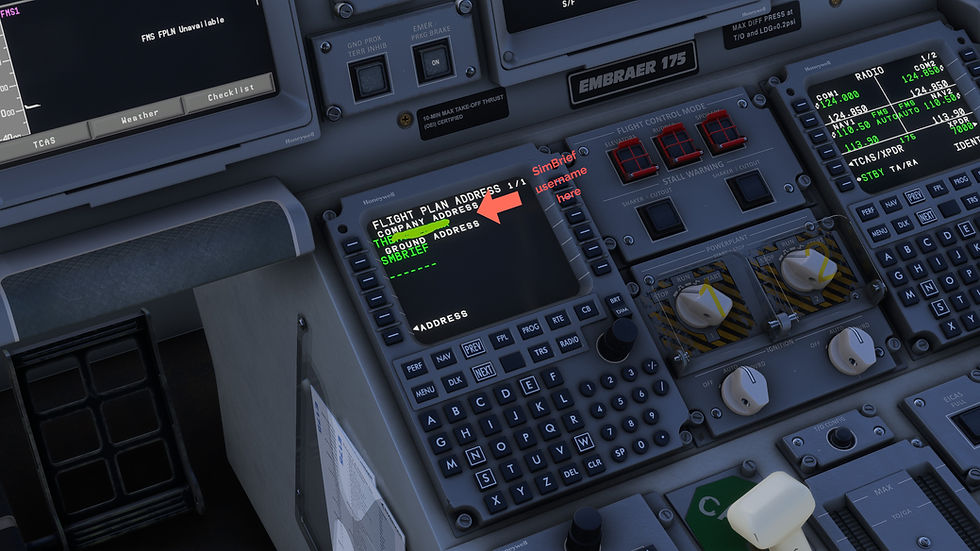
On the MCDU, go to NAV, then DATALINK, then ADDRESS, then FLIGHTPLAN.
Enter your SimBrief username (we have the best luck with using the username) or user ID as the COMPANY ADDRESS.
Import the route
There are two ways to do this, but we recommend the following:
On the RTE page, enter your departure and destination ICAOs and activate. Then press DLK PFL (LSK 3L) to request the flight plan.
Import performance data
Go to PERF INIT and press SEND REQST. This pulls the performance data from your latest SimBrief plan. If you import performance from SimBrief, make sure your EFB load matches the plan before pressing CONFIRM INIT
With the route loaded, go back to the preflight guide to set your runway, SID, STAR and approach, and to clear out any discontinuities.
Navdata Now Lives in the EFB
This changed from early access. You no longer update your Navigraph data through the separate external app. Updates now happen inside the aircraft's EFB.
If you used the external tool during early access, you can stop using it.
Four E175 Routes to Fly First
WY011 KPDX–KEUG. A quick hop down the valley to Eugene. It's short enough to repeat a few times while you learn the flow.
WY163 KPDX–PASI. Sitka, Alaska. Coastal terrain and weather that can change fast. With fall and soon winter in Alaska, it is a thrilling route to fly.
WY295 KDEN–KASE. Denver to Aspen. A high field with a tight approach, and a good test of how well you know the airplane.
WY243 KPHL–KBTV. Philadelphia to Burlington, Vermont, perfect to catch the fall color in New England.
Go Fly It!
The FSS documentation covers far more of the systems than this post does, and it's worth reading to get fully up to speed. Book an E175 flight, and enjoy our fun and flexible regional routes!


Comments